From decision to review: the context that travels with work
A visual journey through documents, tasks, and review: keep sources connected and check the result without losing the thread.
A team can have plenty of tasks and still lose the thread. The difficulty appears when a decision lives in a document, work lives on a board, and the result lives in a conversation. The connection between those pieces is what makes work understandable.
Keep the reason behind the work
The same task, two ways to receive it
An example of work organization, not a performance comparison between products.
An isolated request
“Review the release.” What changed, where are the acceptance criteria, and who makes the final decision?
A connected request
“Review the release using this runbook.” The task links the decision, identifies the owner, and explains what evidence should accompany the result.
Three pieces the team can trace
From decision to review
- 01
A decision with a source
Record what was decided, why, and who can answer a question. A useful document lets you return to the source without reconstructing a conversation.
- 02
A task with context
Define the expected result and link the decision. The person receiving the task needs to understand what done means.
- 03
A review with evidence
Bring together the result, the checks performed, and the open questions. Review requires comparing what was delivered with what was requested.
Context stays connected
Select a stage. The top line traces the path leading to it; the original document still exists.
Select a stage to trace its context.
Record what was decided, why, and who can answer a question. A useful document lets you return to the source without reconstructing a conversation.
Explains the request →Define the expected result and link the decision. The person receiving the task needs to understand what done means.
Defines what to check →Bring together the result, the checks performed, and the open questions. Review requires comparing what was delivered with what was requested.
Lets you return to the decision
Look at the product with a specific question
In a project view, first locate the project, then its status, and finally the way into the work. The following screenshot contains demonstration data and shows a product view; it does not represent a live execution.
Three points to find your bearings
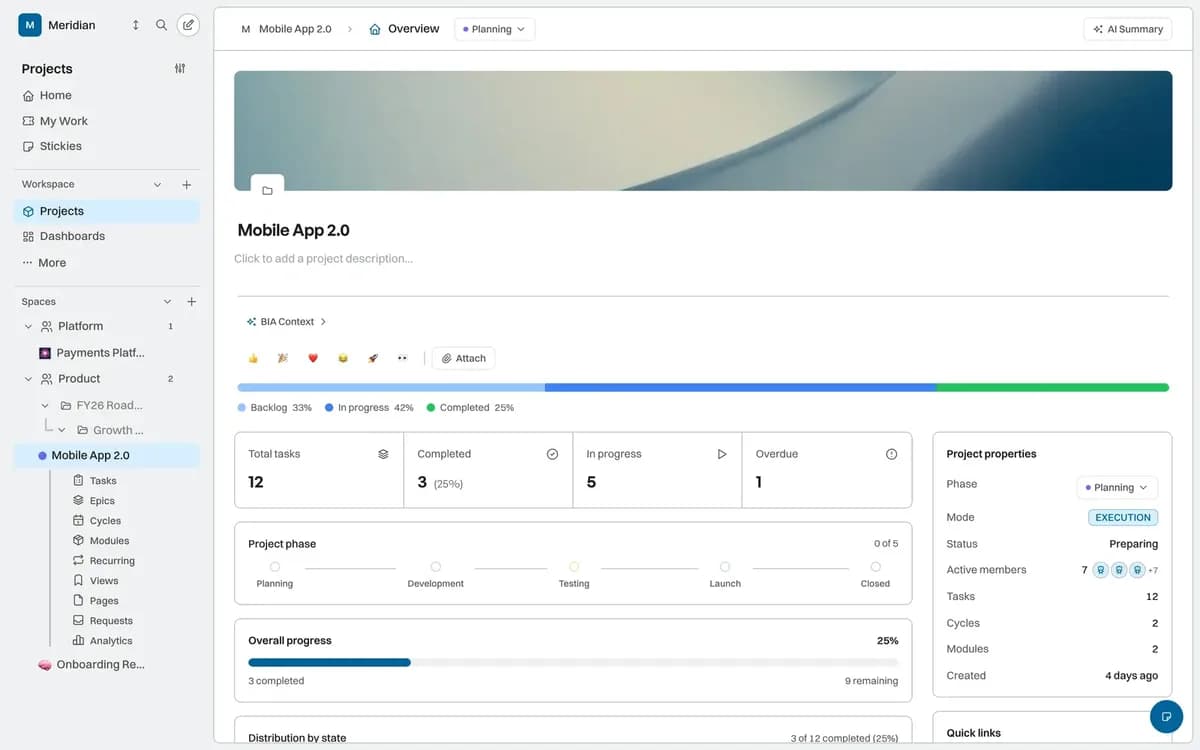
Product screenshot with demonstration data.
Navigation places the project within the workspace.
The name identifies the work under review.
The summary helps you decide where to look next.
Measure without inventing savings
Before promising that AI saves time, check whether work has enough context to be reviewed. This example dataset illustrates the method: count tasks with a linked decision and tasks with a review criterion. It measures no customers and demonstrates no productivity improvement.
What context do these tasks have?
Illustrative exampleIn this example of eight tasks, six link to a decision and four have a review criterion. The groups can overlap.
View data and methodology
| Category | tasks |
|---|---|
| Example total | 8 |
| Linked decision | 6 |
| Review criterion | 4 |
Values created to explain the count: eight tasks, six linked to a decision, and four with a review criterion. A task may belong to both groups. These are not customer data or savings percentages.
Source: Illustrative dataset for this article
Where AI fits
This journey is a way to organize work. BIA is in preview and internal agents are in alpha: context access and available actions depend on enabled capabilities and authorized scope. In supported workflows, an AI proposal should retain its sources and go through the review defined by the team.
Start with one project and one decision. Check whether another person can get from the request to its source and from the result to its acceptance criteria. That small test says more about context quality than an animation or a number without methodology.
Ready to see it in action?
Explore how BIKLABS brings AI agents into your project workflow.